
Generate Bulk QR Cards for Photo Fulfillment
Create scannable cards in bulk to label, sort, and track photo orders.
Bulk QR Card Generator turns a list of subjects, one per line, into scannable QR cards for photo fulfillment. On this page you can paste your list and see how many rows are detected. Generating the cards and print-ready sheets runs in your Printcart dashboard and uses Printcart AI tokens.
0 value(s) detected. CSV import and print-ready sheets unlock in the dashboard.
- Free on this page: paste your list and see how many rows are detected. Nothing is generated or uploaded.
- Needs an account and tokens: generating QR cards and sheets runs in your Printcart dashboard.
Pricing
Uses Printcart AI tokens from your balance.
Sign in or create a free account to process — uses Printcart AI tokens.
Already have an account? Sign in
What this tool does
Bulk QR Card Generator creates QR codes in bulk so you can label, sort, and track subjects across a photo fulfillment workflow. Use it for school, studio, sports, and event operations where each subject, package, or order needs a scannable code to keep photos organized from capture through delivery.
What to expect
You supply the list of values or links, and the tool produces matching cards. Generated codes should be tested by scanning before a large print run, and you remain responsible for the accuracy of the underlying data. Register to generate large batches, apply card templates, and export print-ready sheets.
Example QR sheet preview
Public preview
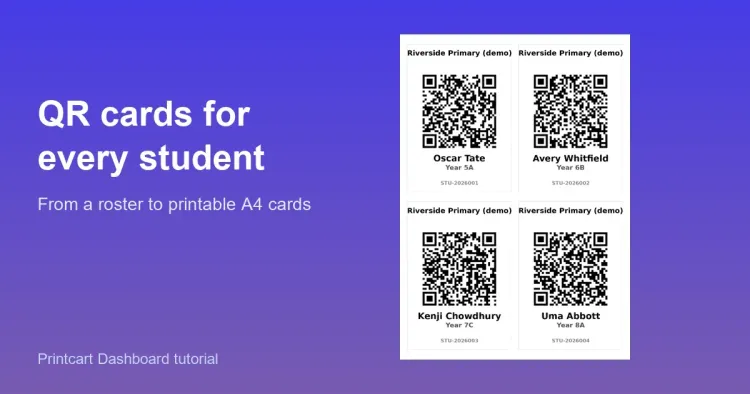
The public sample describes the generated card sheet structure so teams can see the expected fulfillment output before running a real batch.
Cards
4-up sheet with subject ID, name label, class label, and scannable QR area.
Checks
Scan-test reminder appears before print because QR data accuracy belongs to the uploaded list.
Production step
Sign in to generate large batches, apply templates, and export print-ready sheets.
This is a static public sample, not an AI production result. Full runs, saved results, batch export, and API usage require a Printcart account and available tokens.
Register to save, export full-res, and batch
Free previews generate a handful of cards. Create a Printcart account to build large batches, apply card templates, and export print-ready sheets for fulfillment.
Learn this tool with real screenshots
Keep fulfillment organized
Before you run a job
You supply the list of values or links, and the tool produces matching QR cards. You remain responsible for the accuracy of the underlying data behind each code.
Yes. Scan a sample of generated codes before a large print run to confirm they resolve correctly, since a bad batch is costly to reprint.
A free Printcart account lets you generate large batches, apply card templates, and export print-ready sheets for your fulfillment workflow.
You might also need
New to these tools? Read the photo commerce tools tutorial
Ready to Transform Your Print Business?
Unlock the full potential of your printing operations with Printcart's comprehensive Web-to-Print solutions.