
Check Print Files Before Production
Catch DPI, bleed, color, and font problems before a job reaches production.
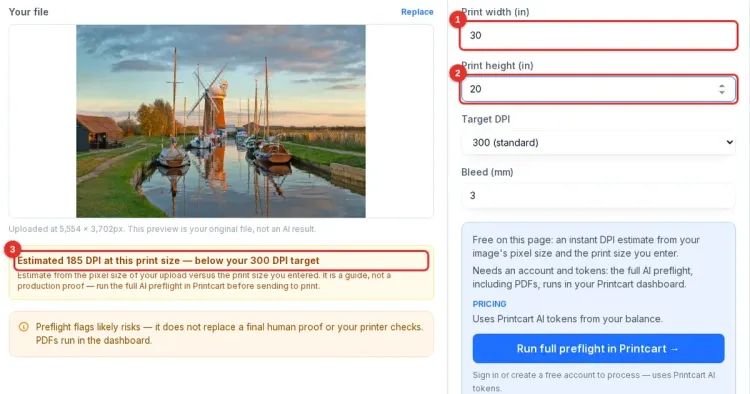
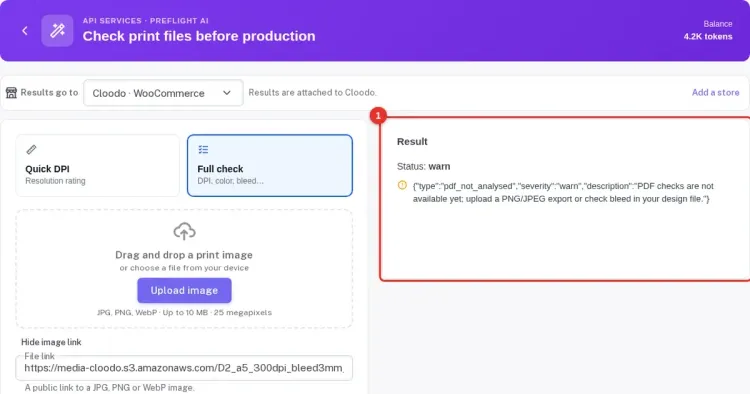
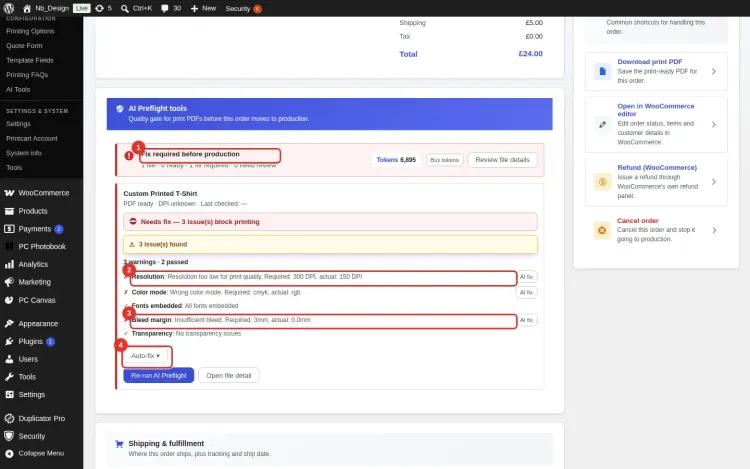
Check Print Files reviews your artwork against a real production profile: size, bleed, safe area, resolution, color mode, transparency and fonts. It tells you whether the file is print ready, needs attention, or must be fixed. Basic checks are free, need no account and never use tokens; only optional AI fixes do.
Check Print Files
Ready to check
Checking for
Loading production profiles…
Check your artwork
or drag and drop your print file here
PDF, PNG or JPG · up to 10 MB
- No tokens for basic checks
- Your original file stays unchanged
- Files are not kept after the check
How it works
From artwork to print ready
A clear path from upload to a file you can print.
- 01
Upload your print file
Choose a file or drop it into the workspace.
- 02
Check print readiness
Review size, bleed, safe area, resolution, color, fonts and transparency.
- 03
Fix issues
Follow the recommended action, or use an AI tool where it helps.
- 04
Make it print ready
Replace the file and check again until it passes.
One file.
More possibilities with Printcart.
Explore Product Catalog, Templates and Cliparts. These links do not transfer your file.
What this tool does
Print File Preflight is an AI-assisted check that reviews an artwork file for common production problems before it goes to print — low DPI, missing bleed, risky color setup, and font or sizing issues. Use it before sending a job to production or a fulfillment partner, when accepting customer-uploaded artwork, or when standardizing files across a catalog.
What to expect
Checks are automated against the selected product profile. They catch common production problems but do not replace a final proof from your printer. Issues marked Must fix block the file until it is fixed and checked again; warnings can be accepted after you review them.
Example preflight report
Public preview
The public sample shows the kind of structured report operators can expect: production status, file risks, and next actions to verify against their own print specs.
Status
Needs review because estimated DPI is below the selected print target.
Checks
DPI, bleed, color setup, trim size, and font risks are listed as pass, warning, or blocked.
Next step
Must fix blocks the file; warnings can be accepted after review; Print ready continues.
This is a static public sample, not an AI production result. Full runs, saved results, batch export, and API usage require a Printcart account and available tokens.
Register to save, export full-res, and batch
Basic print checks are free without an account. Create a Printcart account to use AI-assisted fixes such as upscaling and to keep working in your Printcart dashboard.
Learn this tool with real screenshots
Catch problems before they cost you
Frequently asked questions
What the check does, and what it costs.
What does Check Print Files check?
Document size, bleed, safe area, effective resolution, color mode, transparency and, for PDFs, embedded fonts, all against the product profile you choose. Bleed is measured on PDFs; an image has no trim box, so its bleed is flagged as not checked.
Do I need an account?
No. You can run a basic check without one. An account is needed for AI-assisted fixes and for working in the Printcart dashboard.
Do basic print checks use tokens?
No. Basic checks are automated rules and never use AI tokens.
When are AI tokens required?
Only when you choose an AI-assisted action such as AI Upscale, and only after you confirm its price.
What happens if I run out of tokens?
Basic print checks remain available. You can still review issues, replace your file and follow the recommended fixes. Tokens are only needed for AI-assisted actions.
What does Print Ready mean?
The checked file passed every blocking rule for the selected product profile. Warnings can be accepted after review; Must fix issues cannot be skipped.
Are my print files stored?
No. The file is deleted from Printcart’s upload storage as soon as the check finishes. The checker keeps its own working copy for a limited time to produce the report.
You might also need
New to these tools? Read the photo commerce tools tutorial
Bring print file checking to your storefront.
Help customers catch artwork problems before their orders reach production.