
Remove backgrounds. Create product designs.
Get clean product cutouts for POD listings, catalog images, and print designs, then keep creating in Printcart.
JPG, PNG or WebP — choose an image from your device
Remove the background here for free. A full-resolution AI cutout runs in your dashboard and uses tokens.
Background Removal separates a product or subject from its background for listings, catalog images and print designs. Try it free with no account: an instant in-browser preview for plain backgrounds, and a daily AI trial for any photo. The full-resolution AI cutout runs in your Printcart dashboard and uses tokens.
Background Remover
Try free background removal
or drag and drop your image here
JPG, PNG, WebP · Up to 10 MB · 25 megapixels
SettingsBrowser preview
What should stay in your image? Lets the service pick the subject for you — a safe default for most photos.
Selection & print guidance
When to choose this
A good starting point whenever you are not sure which category fits.
Check before export
Check that the subject you wanted is the one that was kept, and that separate objects were not dropped.
Subject type describes what to keep, not where you will print it. Changing it does not change edge softness or the download background.
Crisp cut on the left, feathered on the right
The browser preview runs on your device. An image is sent to Printcart AI only after you choose the cloud and agree.
How it works
From image to product-ready design
A clear path from upload to your next creative step.
- 01
Upload your image
Choose a JPG, PNG or WebP file, or drop it into the workspace.
- 02
Remove the background
Use the free browser preview, or try the real AI in the cloud with no account.
- 03
Review the result
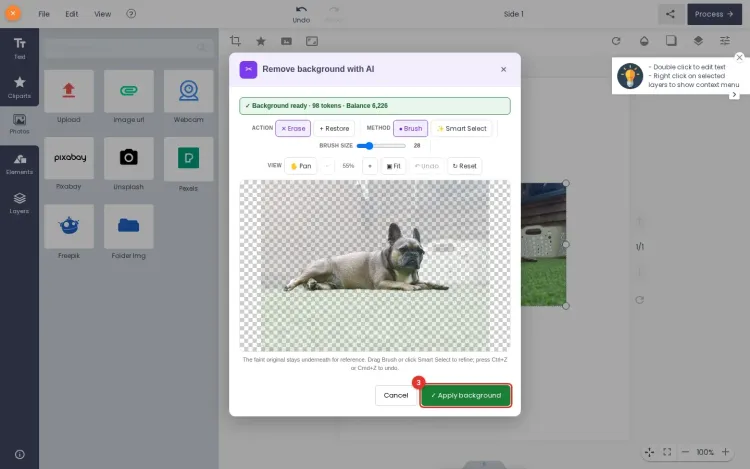
Compare Original and Result, inspect the edges and preview transparency.
- 04
Continue to design
Download the transparent PNG, or continue with the full-resolution AI cutout in your dashboard.
One image.
More possibilities with Printcart.
Explore Product Catalog, Templates and Cliparts. These links do not transfer your image.
What this tool does
Background Removal separates a product or subject from its background, giving you a clean cutout for marketplace listings, catalog images, and print mockups. Use it when photos were shot on messy or inconsistent backgrounds and you need a consistent transparent or white background across a catalog.
What to expect
It works best on clear subjects with defined edges. The free browser preview is a plain-background colour key, not AI, so it only works on photos with a plain backdrop; the full AI cutout in the Dashboard handles any photo. Results are not perfect: fine details like hair, transparent materials, or low-contrast edges may need touch-up, and every cutout should be reviewed before publishing or printing. Register to save results and export full-resolution, batch-ready images.
What the preview result looks like
Public preview
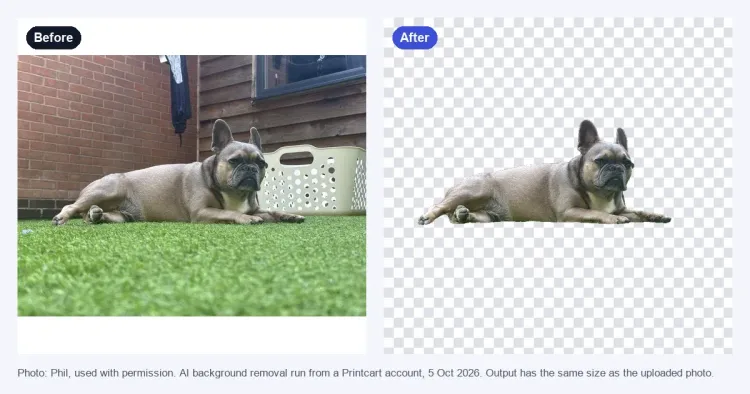
A product photo is shown as a clean cutout with a transparent or white background preview, plus notes for edges that still need review before export.
Output file
Preview PNG cutout with transparent background selected.
Quality note
Edges around hair, glass, shadows, and low-contrast areas are flagged for manual review.
Production step
Create an account to run the real AI job, save the cutout, and export full resolution.
This is a static public sample, not an AI production result. Full runs, saved results, batch export, and API usage require a Printcart account and available tokens.
Register to save, export full-res, and batch
Free previews are great for a quick check. Create a Printcart account to save cutouts, export full-resolution images, and clean up whole catalogs in batches.
Learn this tool with real screenshots
Keep your catalog consistent
Frequently asked questions
Background removal, tokens and result reuse explained.
Can I try background removal for free?
Yes, with no account. The in-browser preview is free and unlimited for photos on a plain background. The Printcart AI trial runs the real AI on any photo a few times a day and returns a watermarked result up to 1,024 px.
Do I need an account?
Not to try or to download. You can download both the browser preview and the AI trial sample without signing in. An account is needed for the full-resolution AI cutout without a watermark, which runs in your dashboard.
Will my download have a transparent background?
Download PNG saves the cutout with transparent areas. Choose White under Settings, then Download background, for an opaque white file. The checkerboard, light, dark and custom colors in the viewer are for preview only and are not added to the file. Always check the edges of your subject before use.
When does a removal require tokens?
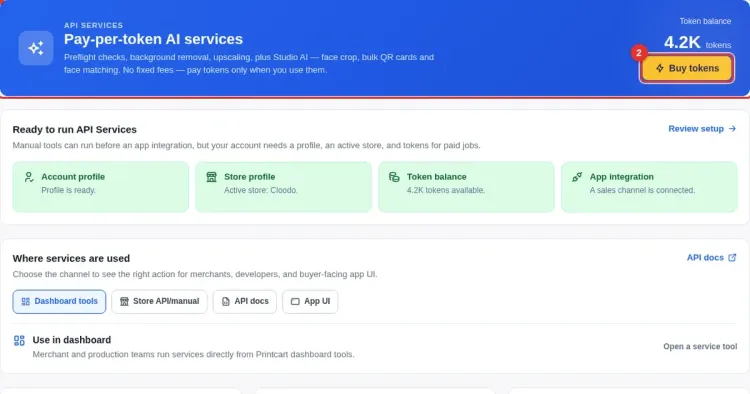
Only for the full-resolution AI cutout in your dashboard. You see the token price and confirm it before the job starts; nothing is charged before you confirm, and you are not charged for a job that fails. The browser preview and the AI trial never use tokens.
What is the difference between the preview and the AI version?
The preview separates a subject from a plain background by color, on your device, up to 1,600 px. The AI version handles hair, fur, glass, shadows and busy backgrounds: the free trial returns a watermarked sample, and the dashboard keeps your original resolution. Review every cutout before you publish or print.
How are my images stored and removed?
The browser preview never leaves your device. For the AI trial, your photo is sent to Printcart only after you agree, and trial files are deleted within an hour. If you continue to your dashboard, the image is kept for up to a day for your job.
Does downloading the result again use more tokens?
No. Downloading the same result again is free; only a new AI run uses tokens. Results in your dashboard stay downloadable for 24 hours.
What images work best?
JPG, PNG or WebP up to 10 MB and 25 megapixels. Photos with a clear subject and defined edges on a plain or contrasting background give the cleanest result. Busy or low-light scenes are harder and often need review.
You might also need
New to these tools? Read the photo commerce tools tutorial
Bring background removal to your storefront.
Help customers prepare their images while designing your products.