
Key takeaways
- Check resolution, bleed, safe area, color mode, transparency, and font handling before the file is sent to print.
- Use AI checks as a first pass, then keep a human approval step for expensive, large-format, or brand-sensitive jobs.
- Treat this as an ongoing operating workflow, not a one-time setup task.
- Document the approval owner, fallback process, and production handoff before customers start ordering.
- Review the workflow after the first real orders and tighten the steps that cause rework.
Updated on 2026-10-07. Printcart publishes this comparison and makes one of the tools tested. We ran every tool ourselves with the same files and default settings, and we show the cases where other tools did better.
We did not run Let's Enhance. Its terms (clause 3e, effective 2024-03-01) forbid using the service for benchmarking or competitive analysis, and its free tier needs an account. This article therefore shows Printcart's own measured results next to Let's Enhance's published features and prices, each with its source and date. Nothing here compares image quality between the two.
Summary: Printcart vs Let's Enhance at a glance
| Criterion | Printcart | Let's Enhance | Verdict |
|---|---|---|---|
| Image quality | Measured (see crops) | Not tested (terms) | Not compared |
| Largest output | Tested up to 3840x1524 (5.9 MP) from a 10 MB upload limit | Up to 256, 350 or 512 MP by paid plan (pricing page) | Let's Enhance documents far larger outputs |
| Sign-up | Account and tokens for AI processing | Account required; 10 free credits at sign-up | Similar |
| Watermark | None seen on outputs | Free plan has a watermark (pricing page) | Printcart better on what we saw |
| API | Service API tested | Enhancer and Upscaler APIs listed | Similar |
Pixels and file sizes are measured on the Printcart side only. Let's Enhance figures are quotes from its public pricing page.
How we tested
Date, tools and versions
- Printcart Image Upscale (/tools/image-upscale), run 2026-10-06 (UTC) through the service API as the Printcart test account (paid tier, token wallet). Default engine, scale 2x.
- Let's Enhance: not run. Pricing page letsenhance.io/pricing read 2026-10-06; terms letsenhance.io/terms read 2026-10-06.
Input set
| Code | File | Pixels / size | Source and licence | Why it is hard |
|---|---|---|---|---|
| D5 | D5_a4_800.jpg | 800x600 | Phil, used with permission | Soft phone detail |
| D6 | D6_a1_lossy_1200.jpg | 1200x800, 44 KB | Phil, used with permission (JPEG quality 15) | Heavy JPEG compression blocks |
| P4 | P4_logo_300px.png | 300x300 | Printcart test library, fictional brand | Thin serif text at 300 px |
| A16 | A16.jpg | 1920x762, 674 KB | Stock panorama with licence in the library manifest | Water and foliage texture |
Every tool received exactly the same files. Download the inputs and the original outputs (ZIP); each side has a meta.json with the date, URL, plan, settings and file hashes.
Default settings
Printcart: default engine, 2x. Let's Enhance: not run.
Rubric
| Criterion | Weight | How measured | Printcart | Let's Enhance |
|---|---|---|---|---|
| Detail and sharpness | 25 | Crops at 100% | Observed, not scored | Not tested |
| Artefacts | 15 | JPEG blocks, halos at 100% | Observed, not scored | Not tested |
| DPI at print size | 20 | Output pixels divided by inches | Calculated below | Not tested |
| Maximum factor on tested plan | 10 | Highest factor offered | 2x and 4x (page) | Not tested |
| Sign-up and watermark | 10 | First result without an account; watermark | Account needed; none seen | Account needed; watermark on free (pricing page) |
| Batch and API | 10 | Public API; batch | API tested; batch not | API listed; personal-plan batch not stated |
| Price per result | 10 | Plan price divided by results | Priced in tokens (see Pricing) | $9, $24, $34 per month for 100, 300, 500 credits |
No totals: the competitor was not run, so no weighted score is given for either side. Visual scores are provisional: one reviewer (an AI agent working from the saved files) scored them, not the two human graders our standard asks for. The numbers (pixels, bytes, seconds, sharpness metric, decode counts) are measured.
Repeating the test
Results can change as tools update. You can repeat this test: download the same input set, use default settings, and compare at 100% zoom. We re-test every quarter and log changes below.
Results by criterion
Printcart results at 100%
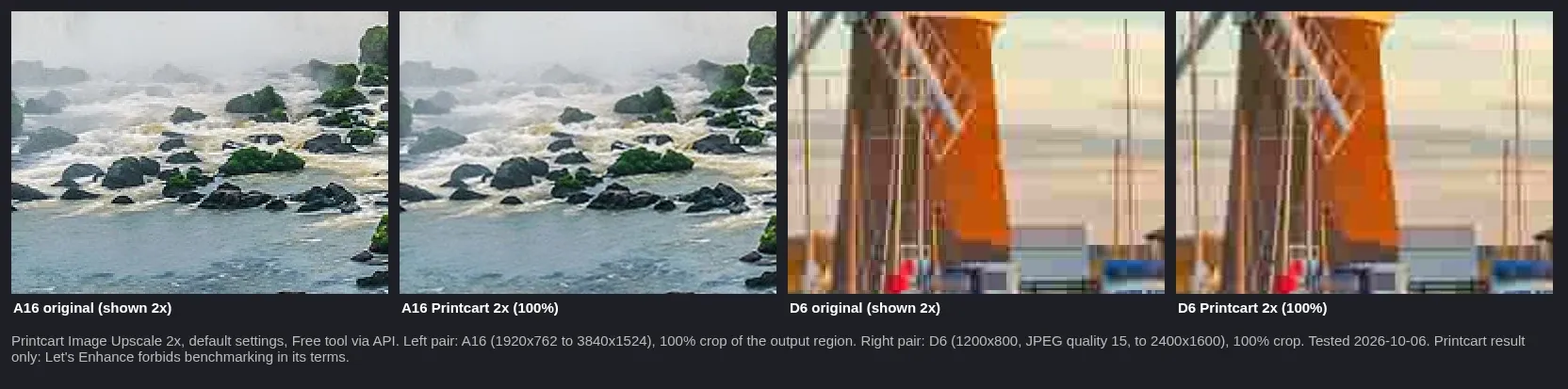
Inputs: stock panorama and Phil's photo (used with permission). Output: Printcart Image Upscale 2x, default settings, 2026-10-06. Left pair A16, right pair D6.
A16 gained clean, smooth texture. On D6 the 2x result is smoother but the blocky JPEG pattern is still visible, so upscaling did not remove compression damage.
Size and DPI at print size
| Input | Printcart output | DPI at 11x14 in (long side 14 in) | DPI at 24x36 in (long side 36 in) |
|---|---|---|---|
| D5 | 1600x1200 PNG, 3.74 MB | 114 | 44 |
| D6 | 2400x1600 PNG, 3.38 MB | 171 | 67 |
| P4 | 600x600 PNG, 72 KB | n/a (square logo) | n/a |
| A16 | 3840x1524 PNG, 12.9 MB | 274 | 107 |
Time per job: 6 to 11 seconds (one run each). Printcart refused our 15.1 MB file A12 with HTTP 422 (limit 10 MB) and spent no tokens.
Let's Enhance, from its public pages
Free plan: 10 credits at sign-up, upscale up to 8 megapixels, watermark. Starter $9/month with 100 credits (up to 256 MP), Pro $24/month with 300 credits (up to 350 MP), Max $34/month with 500 credits (up to 512 MP). Enhancer and Upscaler APIs are listed (letsenhance.io/pricing, read 2026-10-06). Billing is by credit.
Where Let's Enhance wins
- Output ceiling: Let's Enhance documents outputs up to 256, 350 or 512 megapixels on paid plans, far above the 5.9 MP outputs we produced from Printcart's 10 MB upload limit.
- A plainly stated free trial: 10 credits on sign-up, and a published price list per monthly plan.
Where Printcart wins
- No watermark on the Printcart outputs we saw, while Let's Enhance lists a watermark on its free plan.
- Printcart results stay inside the Printcart account and can feed the preflight and store tools (we did not test this chain here).
Pricing and limits (as of 2026-10-06)
- Printcart (api.printcart.com/v1/public/pricing, read 2026-10-07): plans Free 50 tokens a month, Starter $29 for 3,000, Pro $99 for 20,000, Business $299 for 100,000 and Partner $999 for 500,000 (6-month commitment); at Starter, one token is about $0.0097. Image Upscale costs 60 tokens per image, flat (about $0.58 on Starter). See AI wallet pricing.
- Let's Enhance: Free 10 credits; Starter $9, Pro $24, Max $34 per month for 100, 300 and 500 credits (letsenhance.io/pricing, read 2026-10-06).
Prices change; check the vendor's page.
Who should pick which
- Poster seller who needs very large outputs: Let's Enhance documents far higher output ceilings; verify with its free credits yourself.
- POD store already on Printcart: run the upscale in the Dashboard and check the DPI at your print size.
- Print shop with customer files: upscale only after checking whether a better original exists; compression blocks remain visible.
- Developer: both list an API; we tested only Printcart's.
Try it yourself
Open Printcart Image Upscale to see output sizes for 2x and 4x without an account. Guides: Upscale a low-resolution photo for printing and Find out how large you can print a photo.
Changelog and corrections
- 2026-10-06 - first test. Let's Enhance not run (terms).
- 2026-10-07 - added the support address, Printcart token prices from the public pricing API and the pricing call to action.
Spotted an error or a changed price? Email support@printcart.com and we will re-check and update the changelog within 5 business days. Prices change; check the vendor's page.
All product names are trademarks of their owners. Printcart is not affiliated with them.
Process whole folders and save results to your store: see Printcart AI wallet pricing and plans.
Your launch checklist
What should you check before you launch Printcart Image Upscale vs Let's Enhance: Upscaling for Print?
This guide covers web-to-print launch planning, buyer experience, and repeatable production in Printcart. Before you offer it to your own buyers, place one test order yourself with a real product, a real design file and a real checkout, then answer the questions below.
- Can a customer complete the flow without staff intervention?
- Does the production team receive the exact artwork, option, and approval data they need?
- Is there a clear fallback when artwork, pricing, approval, or fulfillment data is missing?