
Key takeaways
What do you need before you start?
- The app W2P & POD Product Personalizer by Printcart already installed on your Wix site.
- Access to that site as its owner or an administrator.
The screenshots come from our own test sites running version 7.2.0, checked on November 3, 2026. Your menu may show other Wix items, but the Printcart screens are the same.
How do you update Printcart for Wix to version 7?
Step 1Find the update
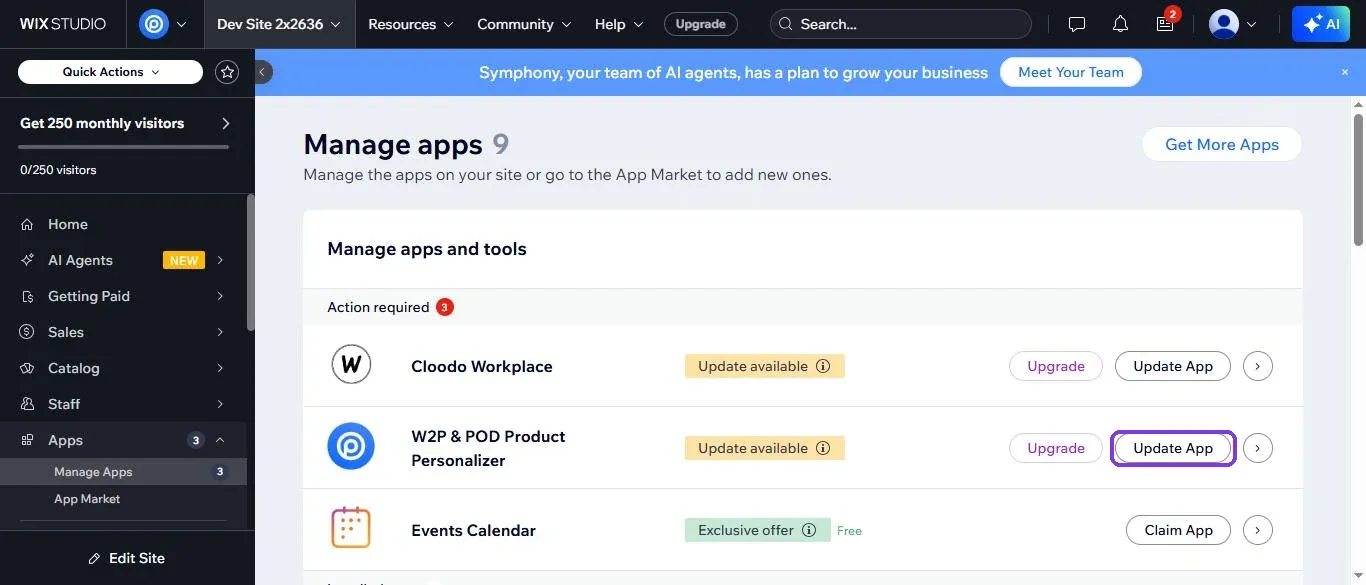
Open the Printcart update link and choose your site in the list. You can also go to Apps > Manage Apps in your Wix dashboard. If your site is on an older version, the app shows Update available with an Update App button.
Expected result: Wix opens a window that starts with Updating W2P & POD Product Personalizer will allow it to.
Step 2Agree and update
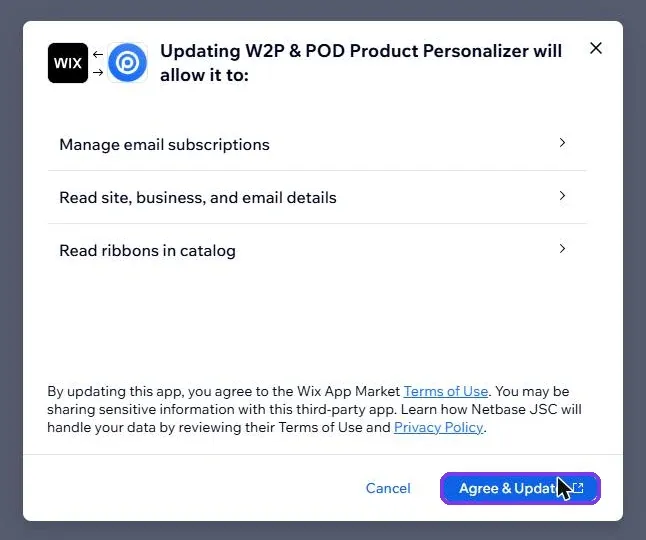
Read the list of permissions, then click Agree & Update.
Expected result: Wix opens the app in your dashboard, and your store shows as Connected on the Overview page.
Step 3Check the version
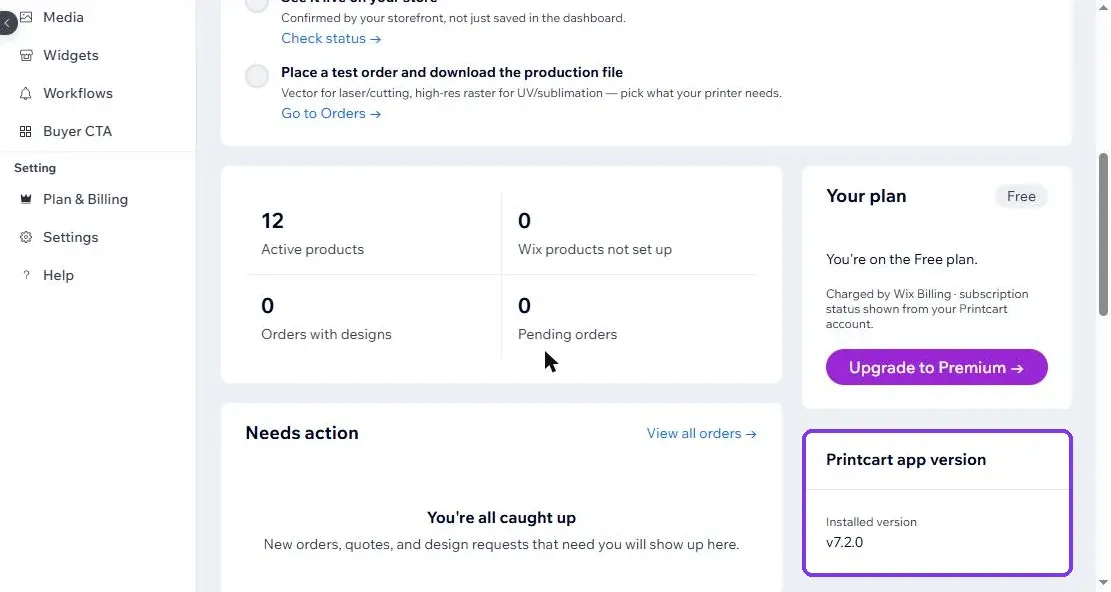
On the Overview page, find the Printcart app version card. The same card is on the Plan & Billing page.
Expected result: The card shows Installed version with the new number, v7.2.0 or later.
What is new on Plan & Billing?
Open Plan & Billing at the bottom of the app menu. Two things changed for store owners: how plans are laid out, and how you pay.
Step 4Compare plans and upgrade through Wix
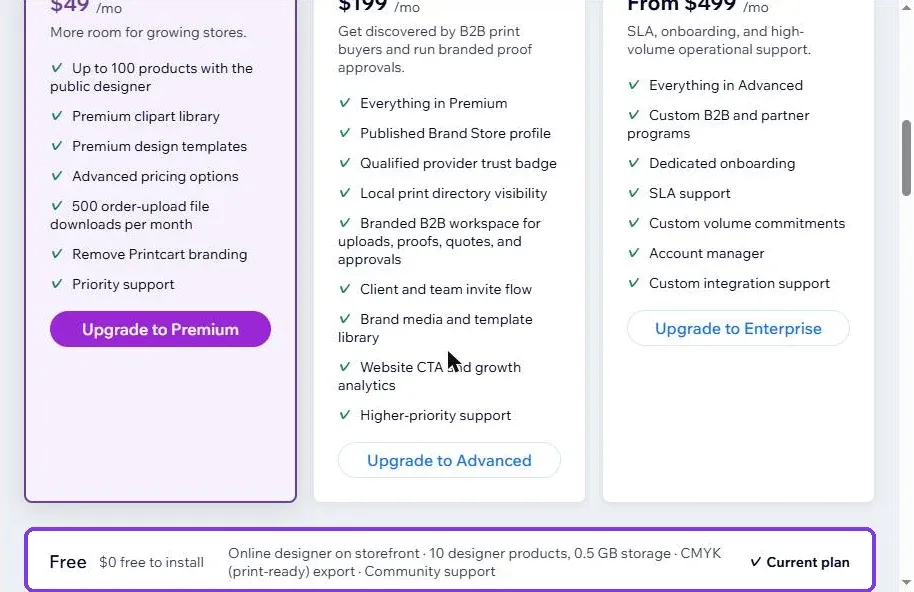
Premium, Advanced and Enterprise now sit side by side, with your Free plan in its own strip below them. Pick Monthly or Yearly at the top, then click the Upgrade button on the plan you want. You pay in Wix checkout, on the same Wix account you already use.
Expected result: Wix checkout opens for the plan and the billing cycle you picked.
Step 5Buy tokens when you need them
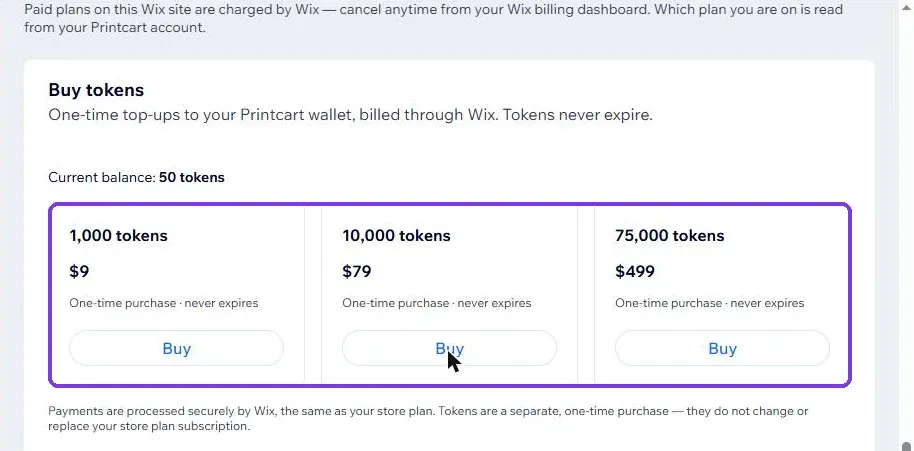
Scroll down to Buy tokens. Choose a pack of 1,000, 10,000 or 75,000 tokens and click Buy. This is a one-time purchase, and your store plan stays as it is.
Expected result: Wix checkout opens for a one-time payment. The section also shows your current token balance.
Why does Wix ask me to update by hand?
A major version of a Wix app can ask for different permissions, and Wix lets the site owner agree to them first. That is why version 7 waits for your click instead of arriving on its own. After you update, later minor versions reach your site without another click.
Does the update cost anything?
No. Updating is free and your plan stays the same. The test site in this guide stayed on the Free plan after updating. Paid plans and token packs are separate choices on the Plan & Billing page.
Do tokens expire?
No. The Buy tokens section marks each pack as a one-time purchase that never expires. A token pack does not change or replace your store plan.
Where can I check which version my site runs?
Open the app and look at the Printcart app version card on the Overview page or on Plan & Billing. After this update it shows the version installed on your site.
How do I get help with the update?
Email support@printcart.com or message the Printcart team on WhatsApp, with a screenshot of the screen you are on.
What should you do next?
Printcart field note
What to verify before you roll out What's New in Printcart for Wix Version 7 and How to Update
This tutorial is written from Printcart implementation patterns across web-to-print launch planning, buyer experience, and repeatable production. Before treating it as complete, test the workflow with one real product, one real design file, and one real order path.
What's New in Printcart for Wix Version 7 and How to Update — common questions
What do you need before you start?
The screenshots come from our own test sites running version 7.2.0, checked on November 3, 2026. Your menu may show other Wix items, but the Printcart screens are the same.
What is new on Plan & Billing?
Open Plan & Billing at the bottom of the app menu. Two things changed for store owners: how plans are laid out, and how you pay.
Why does Wix ask me to update by hand?
A major version of a Wix app can ask for different permissions, and Wix lets the site owner agree to them first. That is why version 7 waits for your click instead of arriving on its own. After you update, later minor versions reach your site without another click.
Does the update cost anything?
No. Updating is free and your plan stays the same. The test site in this guide stayed on the Free plan after updating. Paid plans and token packs are separate choices on the Plan & Billing page.
Next steps in Printcart
Connect what's new in printcart for wix version 7 and how to update with catalog setup, templates, production workflows, and implementation support.
Want to put what's new in printcart for wix version 7 and how to update into practice?
Use the related Printcart tool below, or create a free account to start building with the product designer.