A print-on-demand shirt needs a PNG with a transparent background, because a JPG keeps its white area and prints it as a box. Remove the background, export a PNG, zoom to 100% on a dark and a light backdrop to check the edges, then confirm the DPI at your print size before you upload.
Key takeaways
Why white boxes appear
A JPG cannot store transparency. Every pixel has a colour, so the "empty" area of your design is stored as white. When the file is printed on a navy or black shirt, that white area prints as a box. Printful's file guide says the same: for direct-to-garment products PNG is usually the right choice because it supports transparent backgrounds, and a design saved as JPG may show a visible white background after upload.
Make the PNG
- Look for a better source first. If you drew the design yourself, or a designer made it, export a PNG with a transparent background from the original file. That is always cleaner than cutting out a flat image.
- If you only have a JPG, remove the background. Open printcart.com/tools/background-removal, add the image and download the PNG. The browser preview needs no account and handles a plain backdrop. For full-resolution output, use the Dashboard.
- Export as PNG, not JPG. Keep a copy of the original.
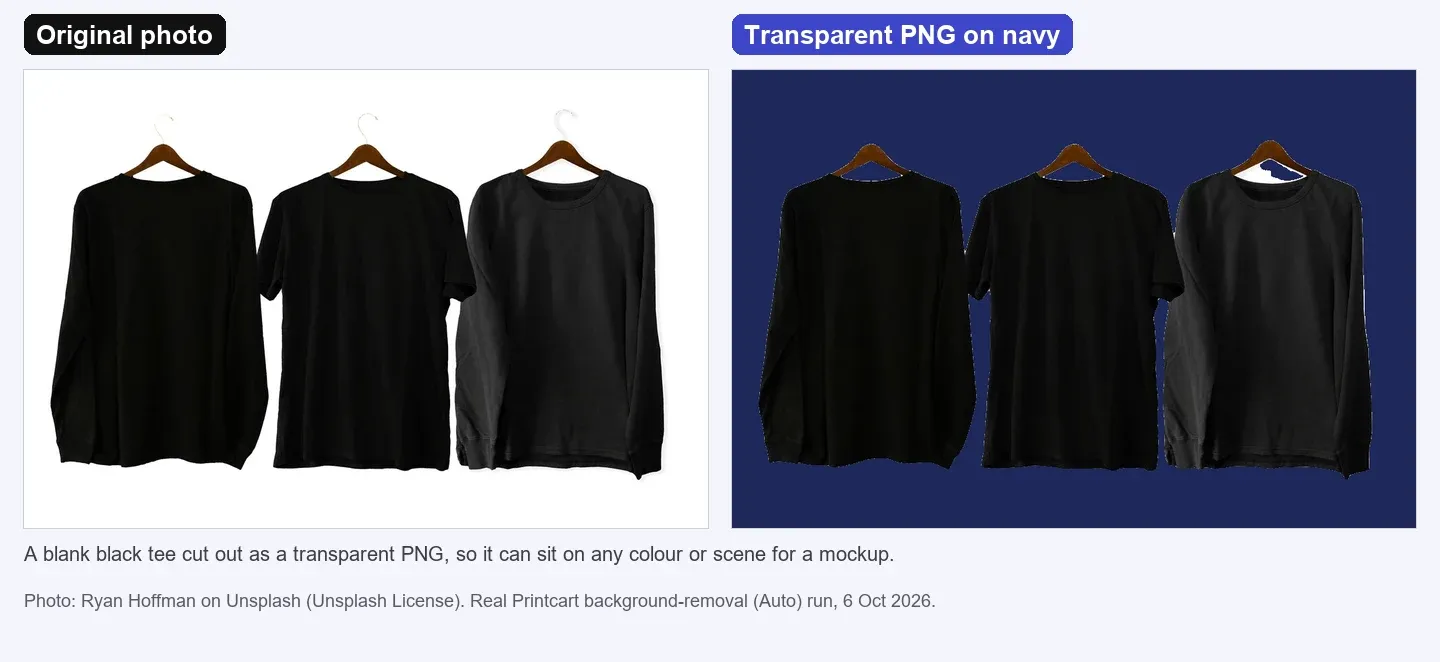
In our test we cut out a photo of three blank tees on hangers that had a white studio background. The result is a transparent PNG with clean garment edges that can sit on any colour, as the image above shows. This test used a garment photo, not a printed design, so check fine lettering and thin lines at 100% on your own artwork: flat artwork with small text is where automatic cutting is least predictable.
Check edges at 100%
Put the PNG on a dark layer and a light layer at 100% zoom. Look for a white or grey halo around the artwork, missing letters, holes inside shapes and rough curves. If you see them, try another subject type or a different edge setting, or go back to the source file.
Check DPI before upload
Printful asks for print files of at least 150 DPI, sized to the actual print dimensions, and states that changing a file's DPI label does not add detail. To check a PNG, open the print file checker, add the file and enter the print size in inches: the page shows an estimated DPI at that size without an account (see Check If a Photo Is Big Enough to Print). If the file is too small, upscale it and check again.
Test notes. Real Printcart runs on 6 October 2026 from a test account. Inputs are real photos: free Unsplash photos (each one is credited in its image) and photos by Phil, used with permission. Prices change; the Dashboard shows the price before every job.
FAQ
Can I make a transparent PNG from a JPG?
Yes, by removing the background. Check the result at 100%: flat artwork with thin lettering can lose detail, and a transparent export from the original design file is more reliable.
Why does my design print with a white box?
The file has a white background instead of transparency. Export a PNG with a transparent background.
Do all print-on-demand products need a transparent PNG?
No. Full-coverage artwork such as posters or all-over prints often uses JPG. Check the file guide of your print provider for each product.
What DPI should the PNG have?
Use the number your provider gives. Printful asks for at least 150 DPI at the actual print size. Check it at your print size, not from the DPI label in the file.
Keep reading
- Background removal tool
- Print file checker (the next step)
- Remove a Product Photo Background on printcart.com
- How to Check DPI and Bleed Before Sending a File to the Printer
- How to Remove Backgrounds from Product Photos for Etsy and Shopify
- Printcart apps for WooCommerce, Shopify and Wix
Ready for whole folders? Process whole folders and save results to your store — choose a long-term plan, or create an account to start.
Sources
Outside facts in this article come from these pages. Rules change, so check the current version before you rely on them.
- Printful Help Center: preparing your print file (accessed 6 October 2026; no date shown).
- Printful Help Center: What is DPI, resolution and actual print file size? (accessed 6 October 2026; no date shown).
Printcart field note
What to verify before you roll out How to Make a Transparent PNG for Print-on-Demand T-Shirts
This tutorial is written from Printcart implementation patterns across file quality, proofing, and production risk. Before treating it as complete, test the workflow with one real product, one real design file, and one real order path.
How to Make a Transparent PNG for Print-on-Demand T-Shirts — common questions
Can I make a transparent PNG from a JPG?
Yes, by removing the background. Check the result at 100%: flat artwork with thin lettering can lose detail, and a transparent export from the original design file is more reliable.
Why does my design print with a white box?
The file has a white background instead of transparency. Export a PNG with a transparent background.
Do all print-on-demand products need a transparent PNG?
No. Full-coverage artwork such as posters or all-over prints often uses JPG. Check the file guide of your print provider for each product.
What DPI should the PNG have?
Use the number your provider gives. Printful asks for at least 150 DPI at the actual print size. Check it at your print size, not from the DPI label in the file.
Next steps in Printcart
Connect how to make a transparent png for print-on-demand t-shirts with catalog setup, templates, production workflows, and implementation support.
Want to put how to make a transparent png for print-on-demand t-shirts into practice?
Use the related Printcart tool below, or create a free account to start building with the product designer.