Printcart's preflight results on three images next to Printful's published DPI rules, read 2026-10-06. Printful's uploader needs an account, so it was not... This guide shows the practical setup decisions, Printcart tools, and production checks needed to apply it.
Key takeaways
Updated on 2026-10-07. Printcart publishes this comparison and makes one of the tools tested. We ran every tool ourselves with the same files and default settings, and we show the cases where other tools did better.
We did not run Printful's uploader. It sits behind a Printful account, and our agents do not create accounts on other companies' services. This article compares Printcart's measured preflight reports with Printful's published file guidance (printful.com, read 2026-10-06). We cannot say how or when Printful's own warning appears.
Quick answer. In our 2026-10-06 test, Printcart's preflight reported the DPI stored in each file: 300 for an 8x10 crop and 72 for two web images, and could not check bleed on JPEGs. We could not run Printful's uploader, which needs an account, so we compared documented rules. Printful publishes per-product DPI minimums; Printcart took one profile per check.
Summary: Printcart vs Printful's file check at a glance
| Criterion | Printcart | Printful | Verdict |
|---|---|---|---|
| DPI check on files | Reads the DPI stored in the file; no print size in the API call | Published minimums: 150 DPI most products, 300 DPI phone cases and stickers | Not compared |
| Bleed on JPEG/PNG | Not checked (no trim box); reported as a warning | Not tested | Not compared |
| Per-product thresholds | One profile per call (we used 300 DPI) | Published per product group | Printful better documented |
| Sign-up | Account needed for the API | Account needed for the uploader | Similar |
| Cost per check | 0 tokens in our runs | Not tested | Not compared |
Printcart's public preflight page estimates DPI from your image size in the browser; the full report in our test came from the Dashboard service.
How we tested
Date, tools and versions
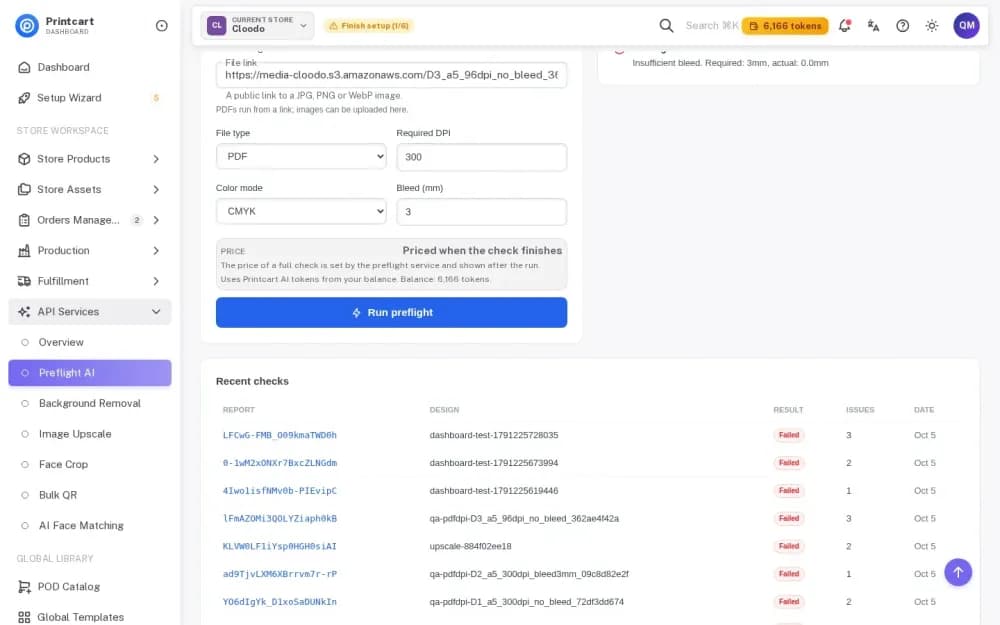
- Printcart Print File Preflight (/tools/preflight), 2026-10-06 (UTC), service API as the Printcart test account; profile: 300 DPI, RGB, 3 mm bleed.
- Printful: not run. Pages read 2026-10-06: printful.com/creating-dtg-file and the terms of service (updated 2026-09-15; no automation or benchmarking clause found).
Input set
| Code | File | Pixels / size | Source and licence | Why it is hard |
|---|---|---|---|---|
| A1 crop | a1_crop-8x10_nobleed_2400x3000.jpg | 2400x3000, 2.0 MB | Phil, used with permission | Exactly 8x10 in at 300 DPI, no bleed |
| A16 | A16.jpg | 1920x762, 674 KB | Stock panorama, licence in the library manifest | Web image with 72 DPI tag |
| D5 | D5_a4_800.jpg | 800x600, 123 KB | Phil, used with permission | Small phone photo |
Every tool received exactly the same files. Download the inputs and the original outputs (ZIP); each side has a meta.json with the date, URL, plan, settings and file hashes.
Default settings
Printcart: required DPI 300, colour mode RGB, bleed 3 mm. The API call takes no print size, so the DPI it reports is the value stored in the file.
Rubric
| Criterion | Weight | How measured | Printcart | Printful |
|---|---|---|---|---|
| Correct detection | 30 | Known faults found / planted | Observed below | Not tested |
| False alarms | 10 | Warnings on a clean file | 0 on the prepared 8x10 crop (one bleed note) | Not tested |
| Coverage | 20 | DPI, bleed, colour, fonts, PDF/X | DPI, colour mode; bleed only on PDF | DPI rules published; uploader not tested |
| Actionable result | 10 | Says where and how to fix | Message with advice (see below) | Not tested |
| Accepted formats | 10 | PDF, JPG, PNG, TIFF | JPEG and PNG tested here | JPEG/PNG up to 100 MB (secondary source) not verified |
| Sign-up and privacy | 10 | Account; file deletion policy | Account needed | Account needed |
| Store integration | 10 | Runs at the store upload step | Not tested in this article | Inside Printful design flow per its docs; not tested |
No totals: the competitor was not run. A planted-fault set (D1-D4 PDFs) is not part of this article. Visual scores are provisional: one reviewer (an AI agent working from the saved files) scored them, not the two human graders our standard asks for. The numbers (pixels, bytes, seconds, sharpness metric, decode counts) are measured.
Repeating the test
Results can change as tools update. You can repeat this test: download the same input set, use default settings, and compare at 100% zoom. We re-test every quarter and log changes below.
Results by criterion
What Printcart reported
| Input | Reported DPI | Status | Issues |
|---|---|---|---|
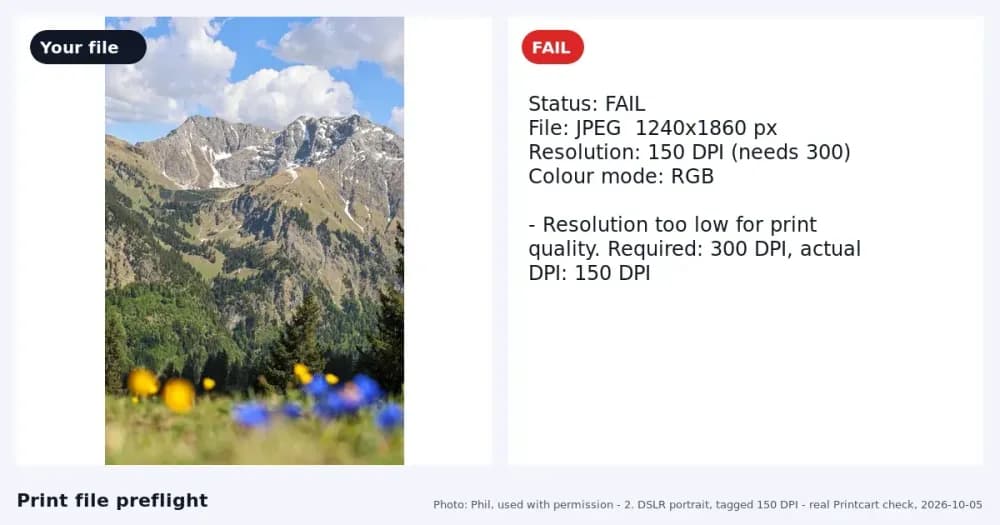
| A1 crop 2400x3000 | 300 | warn | Bleed not checked (a JPEG has no trim box) |
| A16 1920x762 | 72 | fail | Low resolution at the required 300 DPI; bleed not checked |
| D5 800x600 | 72 | fail | Low resolution at the required 300 DPI; bleed not checked |
Each check took 1.4 to 3.5 seconds and spent 0 tokens. Note what the DPI means here: A16 is flagged because the file says 72 DPI, but 1920 pixels printed 6.4 inches wide would be 300 DPI. The API call took no print size, so check the real print size yourself (the public page does that estimate from the image size you enter).
Printful's published rules
Printful says most products need an image of at least 150 DPI, while products such as phone cases and stickers need 300 DPI, and that doubling a design's size halves its DPI (printful.com/creating-dtg-file, read 2026-10-06). These are per-product thresholds; Printcart used one profile (300 DPI) for every file in our run.
Where Printful wins
- Product-specific rules: Printful publishes different minimums for different product groups (150 vs 300 DPI), while our Printcart run applied one 300 DPI profile to every file.
- Printful's checks live in the order and design flow of its own products, so a seller meets them in context. We could not observe them, so we do not rate how well they work.
Where Printcart wins
- Reports are explicit about what was not checked: bleed on a JPEG was returned as a warning with the reason (no trim box), not a silent pass.
- The check ran in 1.4 to 3.5 seconds with 0 tokens in our runs and can sit in front of any printer, not only one vendor's products.
Pricing and limits (as of 2026-10-06)
- Printcart (api.printcart.com/v1/public/pricing, read 2026-10-07): plans Free 50 tokens a month, Starter $29 for 3,000, Pro $99 for 20,000, Business $299 for 100,000 and Partner $999 for 500,000 (6-month commitment); at Starter, one token is about $0.0097. The price of a preflight check is set by the preflight service and shown after the run; it was 0 tokens in our runs. See AI wallet pricing.
- Printful: the file guidance is free to read; the uploader is part of a Printful account (not tested).
Prices change; check the vendor's page.
Who should pick which
- POD seller using Printful: follow Printful's per-product DPI rules for its products.
- Seller using several printers: run one Printcart check before upload and set the profile to the strictest printer.
- Print shop receiving customer files: use the DPI check, then confirm the print size, because the API DPI is the stored file value.
- Developer: Printcart's preflight has a service API; we did not test Printful's tooling.
Try it yourself
Open Printcart Print File Preflight to estimate DPI from your image size. Guides: Run a full preflight check on a print PDF and AI print file preflight.
FAQ
What DPI does Printful require?
Printful says at least 150 DPI for most products and 300 DPI for products such as phone cases and stickers (printful.com/creating-dtg-file, 2026-10-06).
Does a JPEG have a bleed?
No trim box exists in a JPEG, so a tool cannot measure bleed from the image alone. Printcart reported this as "not checked".
Why is my sharp-looking image flagged as low DPI?
The DPI stored in the file may be 72 even when the pixel count is high enough for your print size. Divide pixels by inches to get the effective DPI.
Can Printcart check PDFs?
Yes, in the Dashboard; this article tested images only.
Changelog and corrections
- 2026-10-06 - first test. Printful's uploader not run (account needed); no planted-fault PDF set.
- 2026-10-07 - added the support address, Printcart token prices from the public pricing API and the pricing call to action.
Spotted an error or a changed price? Email [email protected] and we will re-check and update the changelog within 5 business days. Prices change; check the vendor's page.
All product names are trademarks of their owners. Printcart is not affiliated with them.
Process whole folders and save results to your store: see Printcart AI wallet pricing and plans.
Printcart field note
What to verify before you roll out Printcart Preflight vs Printful's File Requirements and Warnings
This tutorial is written from Printcart implementation patterns across file quality, proofing, and production risk. Before treating it as complete, test the workflow with one real product, one real design file, and one real order path.
Printcart Preflight vs Printful's File Requirements and Warnings — common questions
What DPI does Printful require?
Printful says at least 150 DPI for most products and 300 DPI for products such as phone cases and stickers (printful.com/creating-dtg-file, 2026-10-06).
Does a JPEG have a bleed?
No trim box exists in a JPEG, so a tool cannot measure bleed from the image alone. Printcart reported this as "not checked".
Why is my sharp-looking image flagged as low DPI?
The DPI stored in the file may be 72 even when the pixel count is high enough for your print size. Divide pixels by inches to get the effective DPI.
Can Printcart check PDFs?
Yes, in the Dashboard; this article tested images only.
Next steps in Printcart
Connect printcart preflight vs printful's file requirements and warnings with catalog setup, templates, production workflows, and implementation support.
Want to put printcart preflight vs printful's file requirements and warnings into practice?
Use the related Printcart tool below, or create a free account to start building with the product designer.