
 Wix app
W2P & POD Product Personalizer by Printcart
Printcart POD is a web-to-print app for Wix Stores. It gives buyers a built-in designer with templates and image uploads to personalize products such as apparel, mugs and posters. You receive print-ready files in SVG, PDF, PNG and JPG and manage orders from the Printcart Dashboard. It suits print shops and merchants selling custom products on Wix. A Free plan is available.
Step-by-step tutorial →
- Platform
- Wix
- Plan
- Free plan available
- Requirements
- Wix site with Wix Stores
- Last updated
- Oct 4, 2026
Features
Powerful Product Customization Tool
Printcart integrates directly with Wix, offering an intuitive design tool that lets customers customize text, images, and apply templates effortlessly. Boost engagement by providing a seamless design experience right on your store.
High-Resolution Print-Ready Files
Generate print-ready files instantly from your Wix store in SVG, PDF, PNG and JPG formats, so every print starts from clear, accurate artwork.
Connect Wix with Your Systems Using API
Effortlessly integrate your Wix store with CRM, ERP, and accounting systems through Printcart’s API. Automate workflows and sync order data, streamlining your business operations.
Flexible Customization for Your Wix Products
Add multiple product views and customization areas directly on your Wix site so customers can personalize products the way they want.
Fully Tailored Design Experience for Your Wix Store
Easily upload your own clipart, fonts, and images to the Printcart designer tool, customizing it to fit your brand's unique style. Allow customers to create products that perfectly match their vision.
Global Design Templates for Product Side
Apply reusable design templates across various products on your Wix store. Save time and maintain consistency while offering customers a streamlined, professional design experience.
Mock-Ups for Your Products
Create mock-ups for your product variations on your Wix store so customers can visualize their custom designs with high-quality images.
Seamless Store Setup Wizard
Quickly set up your Wix store with Printcart’s step-by-step setup wizard. Import products, select templates, and apply design zones effortlessly to start selling customized products in no time.
Standalone Private Workspace Dashboard
With Printcart’s personalized dashboard, Wix users can manage orders, track designs, and adjust settings in one secure, centralized space, offering full control over the print-on-demand process.
Why merchants choose it
Effortless Integration with Wix
Printcart POD integrates seamlessly with your Wix store, making it easy for small-to-medium businesses to offer customized products without technical expertise. No coding required—just a simple setup to enhance your product offerings.
Increase Customer Engagement with Easy Product Customization
Allow your customers to personalize their own products with easy-to-use design tools. Whether you're selling custom apparel, personalized gifts, or branded merchandise, Printcart’s intuitive design tool encourages customers to stay on your site longer and place more orders.
Professional-Grade Print-Ready Files
Automatically generate high-resolution print-ready files (SVG, PNG, PDF) for each order. This ensures your print-on-demand business delivers top-quality products to customers every time, reducing production errors and ensuring consistency across all orders.
Streamlined Operations with API Integration
For business owners who use other software tools, Printcart’s API integration enables you to connect your CRM, ERP, and accounting systems with ease. This automation ensures that your business operates smoothly, without the need for manual data entry, saving you valuable time and reducing errors.
Screenshots
Watch the demo
Choose how to get started
Start free, upgrade when you need to
Install the app and use the Free plan. Upgrade the store's plan when you need to.
Add to WixView store plansNeed something built for your shop?
Services for the part that is really custom: a custom theme, data migration, or ERP/MIS work.
Browse servicesWhat merchants say
Selected 5-star reviews, quoted from the Wix App Market. Read every review there.
Very great, I had use this app to create and upload many products
The support team is very enthusiastic and attentive
Great!!
I love Princart and the fact that you can utilize their products and with your own branding, make them your own. Compared however to other drop shipping sites, I just wish the system had a larger variety of items. Better joggers, and the ability to place logos and what not on the legs and not just the rear pocket. People very seldom have logos on their pocket. Also, having a better quality bomber jacket would be nice. Finally, allowing more print space on t-shirts and sweatshirts instead of just the chest and back area; sleeves would be nice as well. Other than what I spoke about, I love Princart but more variety would be better as you will find yourself utilizing the same items over and over.
Best Customer Support Ever
I have not optimize my site yet and did not publish any products yet. But as for the ease of use in designing the product and managing store it just great. I had some questiosn about setup and looked for some suggestions to add to my store. Talked with two representatives and they were impressed me. I felt that they card and gave full attention even if i not a big seller.
Works really well!
I can easily choose products, add my design, pick colors, and adjust the price. Then, I can load them onto my website with just one click. This is the best and easiest app to use for my online store. It’s awesome
It is Promising
For someone just starting out in online business like me, i discover that this app is an excellent tool for testing my workflow and launching my ideas. It significant helpful when you are on short of supplies or resources. Although i have to admit that there still much more thing for me to learn, but it is comforting to know that i have this app as a valuable system can support me for the growth of my business.
Love It!!
I have been using Princart product for quite a while now. It surprising me how the app come out where i can trust the quality of the products and the printing. The printing design on the products never fail to impress me. I also love how easy it is to syncs my wix webstore.
Overview
Printcart POD is a Wix print on demand app that adds a product designer and buyer file upload to your Wix Stores products. Each order returns a print-ready file, so you can sell personalized items on Wix without building a designer yourself.
Who it is for
Printcart POD suits Wix merchants who sell products that buyers personalize before they pay.
- Wix print shops: take custom orders for apparel, signage and promotional items and receive files ready for production.
- Online entrepreneurs: sell personalized T-shirts, mugs and posters on a Wix site without extra plugins.
- B2B printing services: manage corporate and bulk print orders from one dashboard.
- Marketplace founders: build a print-on-demand shop on Wix where designers and vendors can work together.
How it works
Setup takes about five minutes and happens mostly inside your Wix dashboard.
- Add the app. Open the Printcart POD listing on the Wix App Market, choose Add to Site, pick your site and approve the permissions Wix lists.
- Let Printcart connect your store. Printcart creates and links a store for your Wix site and imports your Wix Stores products automatically, so you do not paste keys or create a separate account.
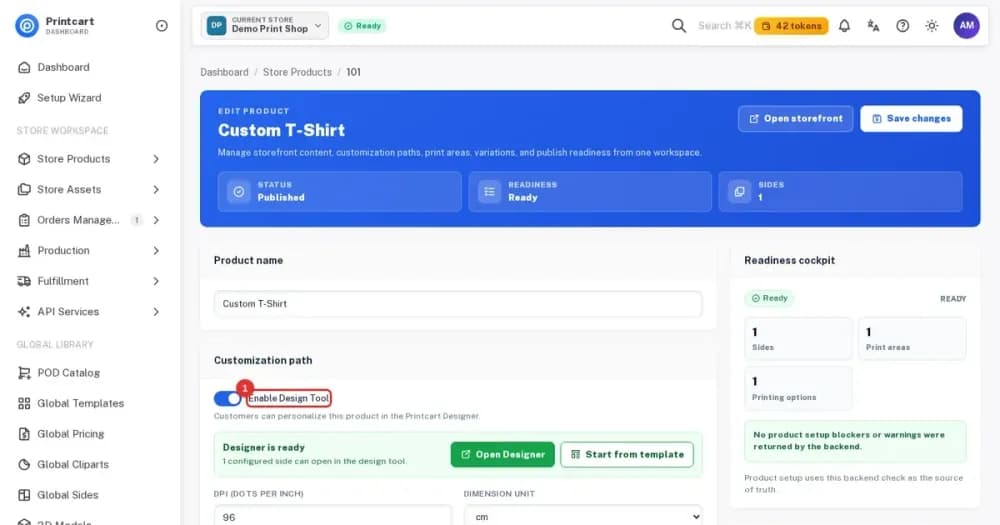
- Switch on products. Turn on Online Design, Order Upload or both for each product you want buyers to personalize.
- Set printing options and pricing. Add the options and pricing rules that match how you produce each product.
- Check your product page. Open the live product as a buyer and confirm the Printcart buttons appear next to the normal Wix buttons.
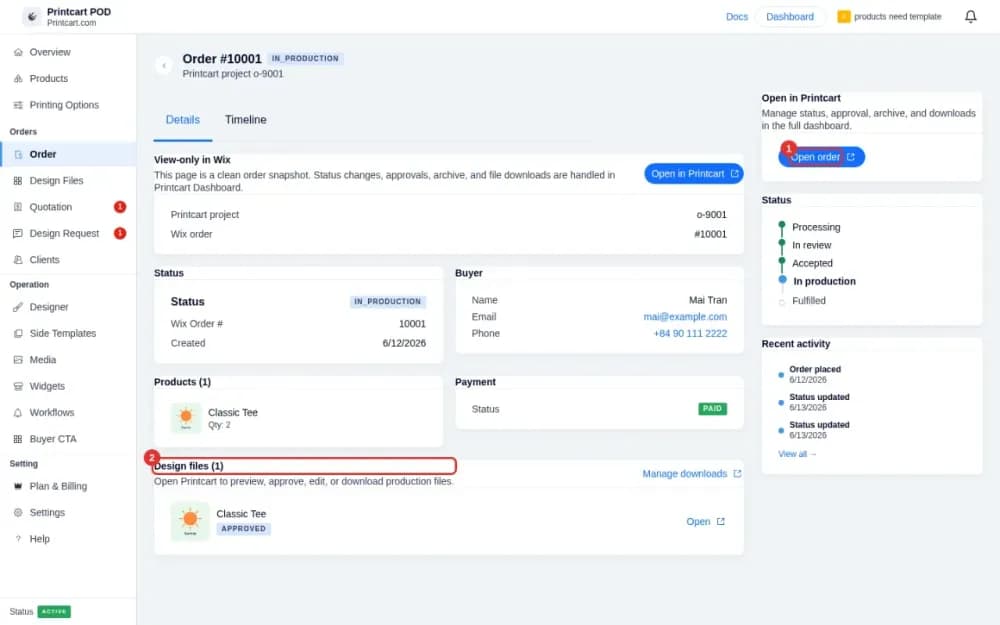
- Receive orders. Orders with Printcart products appear under Order in the app, where you open each one to approve the design and download the print file.
What the buyer sees
On a product that is switched on, buyers see the Printcart buttons under the quantity box and above Add to Cart. They click Customize Online, upload a photo or add text or a template, and click Process to send the item to the Wix cart. The designer also works on a phone, and checkout stays the normal Wix checkout, so your Wix store must be set up to accept online orders.
What you get for production
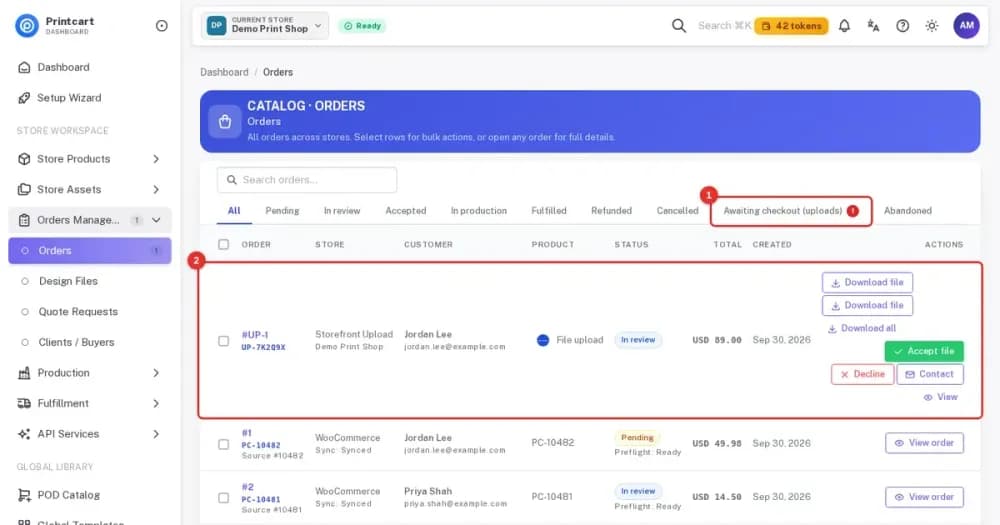
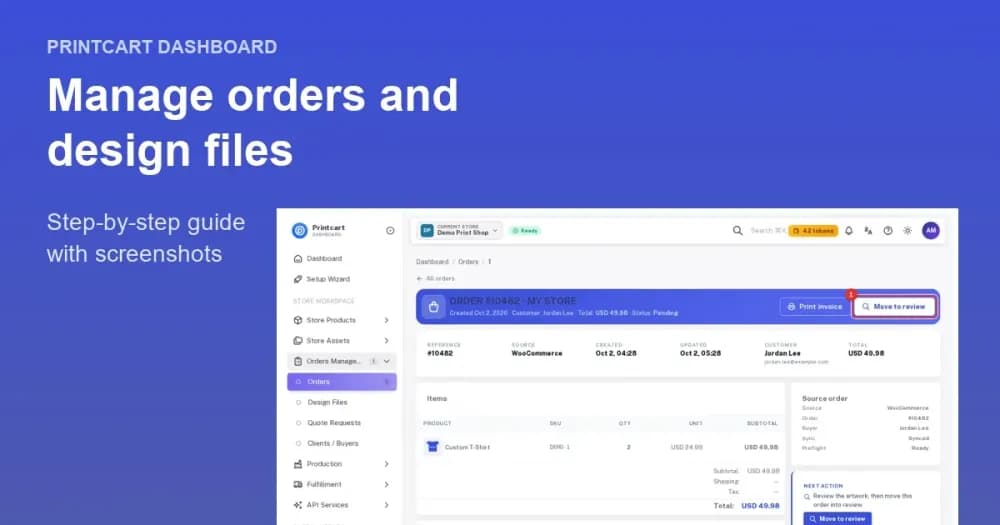
The order page lists the buyer details, the products and the design files. From there you open the order in the Printcart Dashboard to review the design, approve it and download the production file as PDF, PNG, JPG or SVG. Uploads from buyers who have not paid yet wait under Awaiting checkout.
Products you can sell
Printcart POD works for any Wix Stores product that buyers can personalize. Typical examples are apparel such as T-shirts, hoodies and hats, home decor such as posters and cushions, stationery such as mugs, notebooks and calendars, and custom-branded corporate gifts.
Tracking orders
Each order page in the app shows a status tracker from Processing and In review to Accepted, In production and Fulfilled, plus a Timeline tab that lists every change. New stores also see sample orders marked SAMPLE, which you can remove before you go live.
Help and support
You can reach Printcart support with a help desk ticket, live chat during business hours or email at support@printcart.com, and the knowledge base holds tutorials and guides.
Requirements
- A Wix site with Wix Stores and at least one product
- A Wix account that owns or manages the site
- For selling, a Wix plan and a payment method that accept online orders
Plans
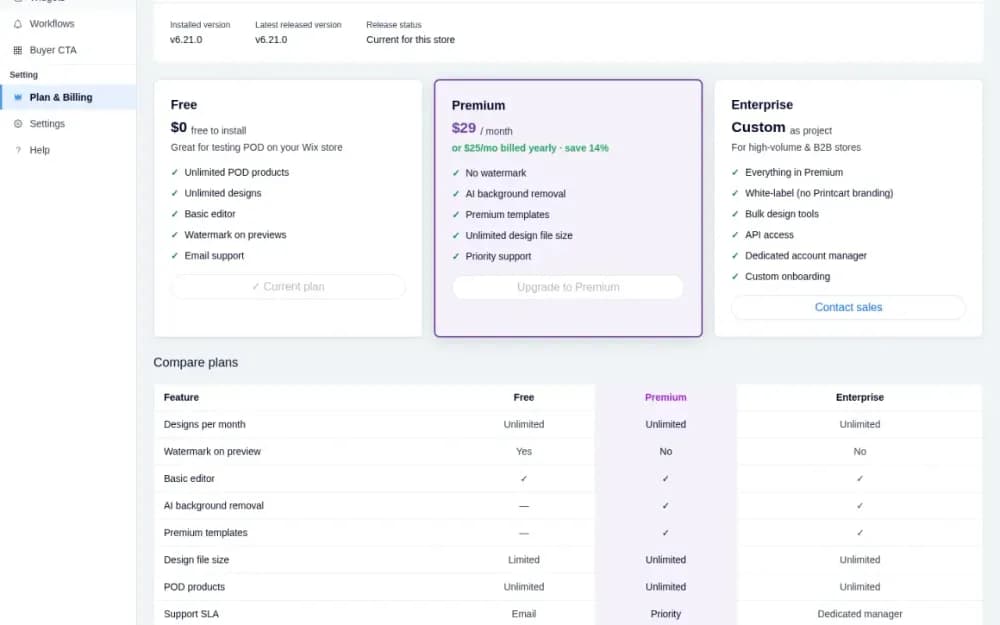
A Free plan is available, so you can install the app and try it without paying. Paid plans are listed on the Wix App Market listing and compared in the plans guide below.
Get started
These parts of the Printcart POD for Wix tutorial series take you from install to your first order.
Tutorials for Wix
More print on demand tutorials →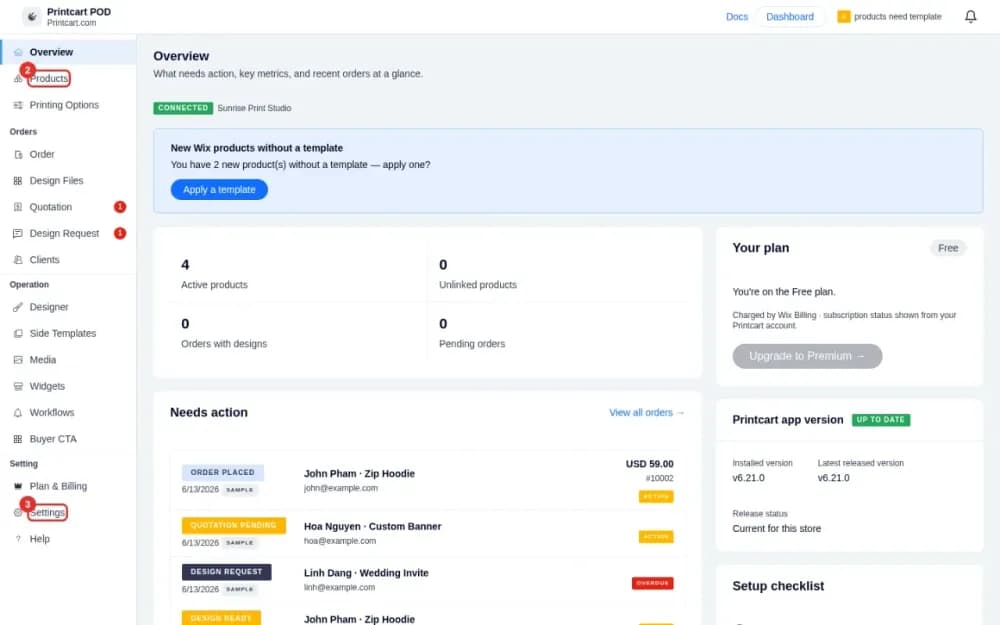
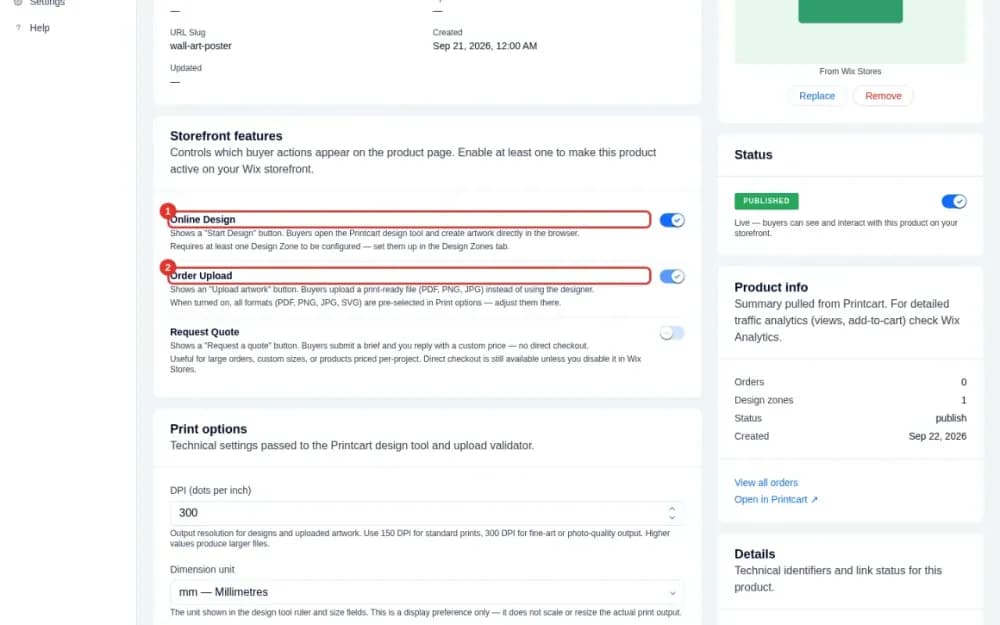
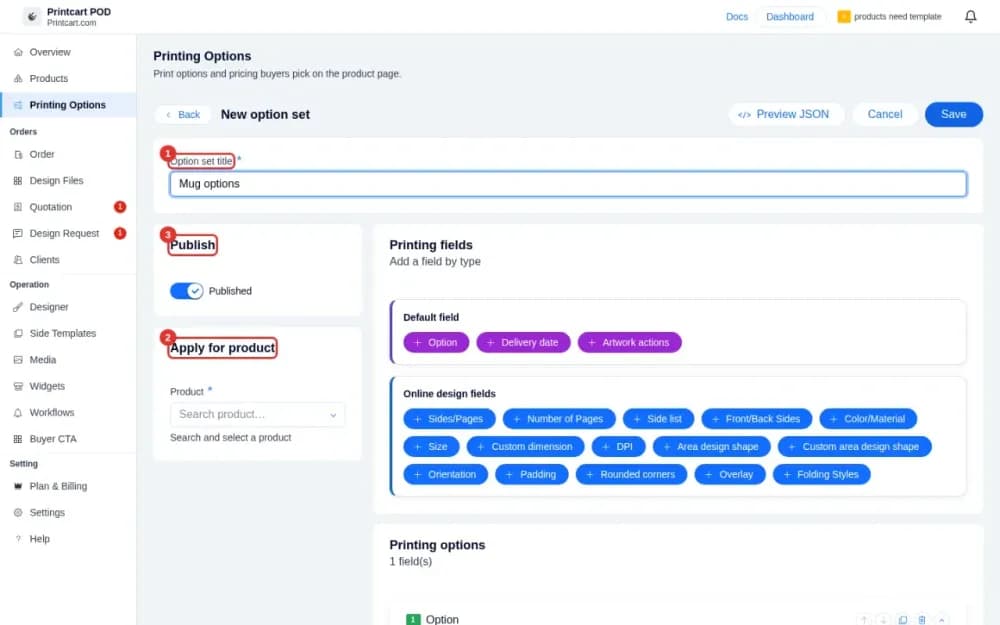
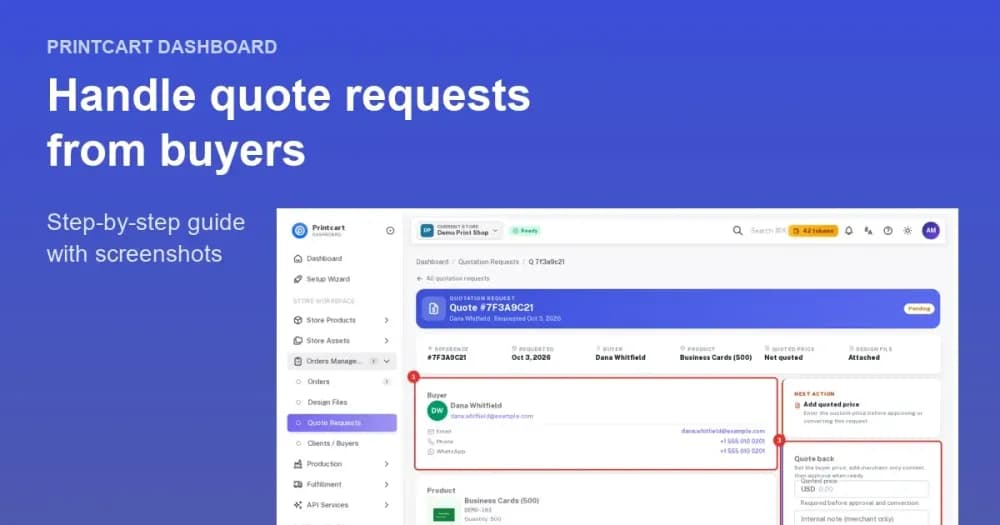
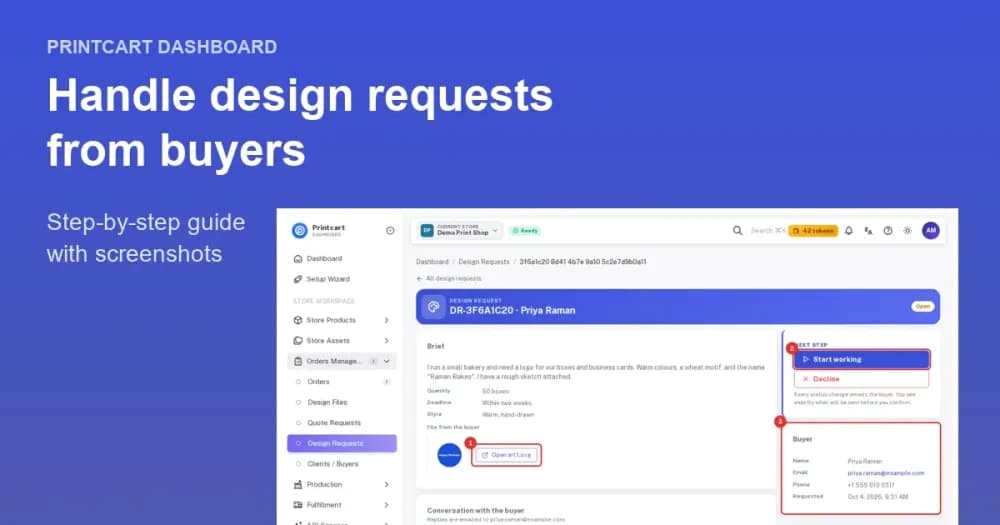
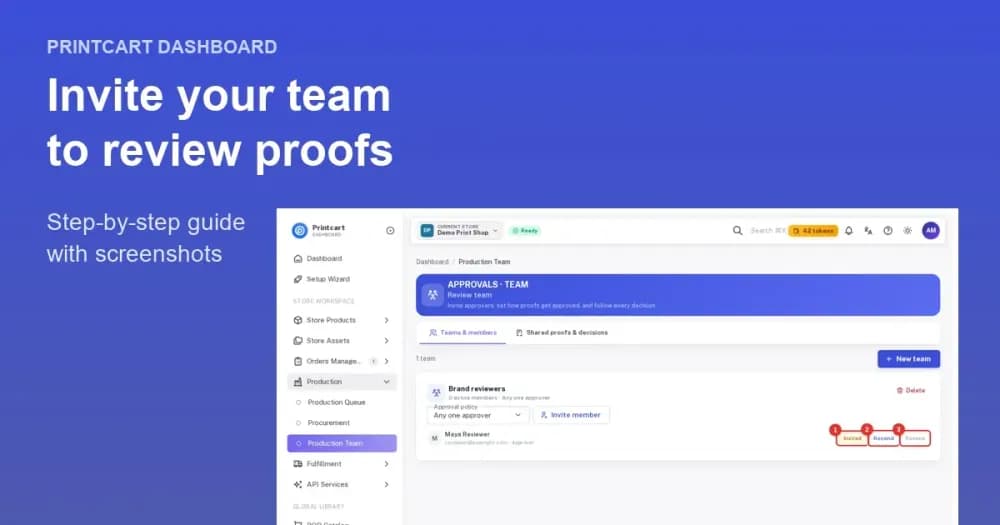
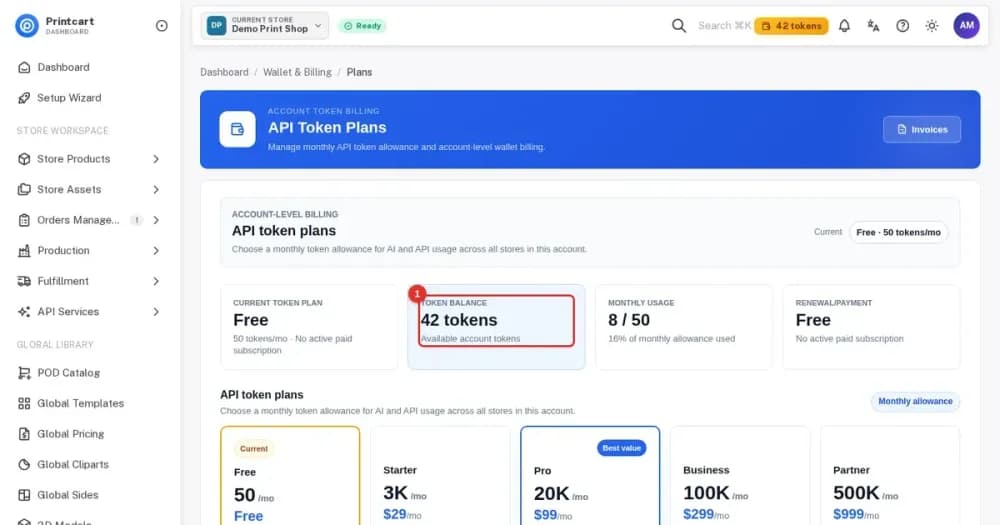
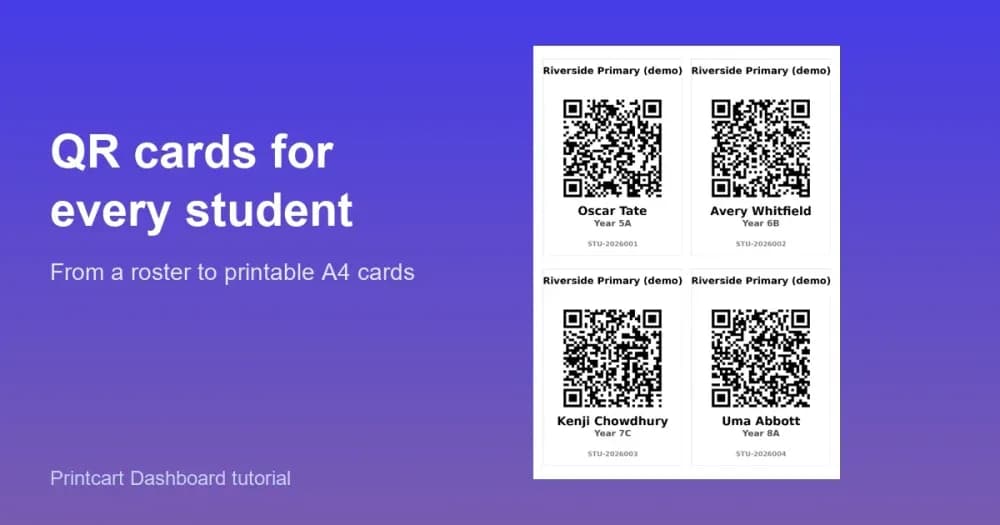
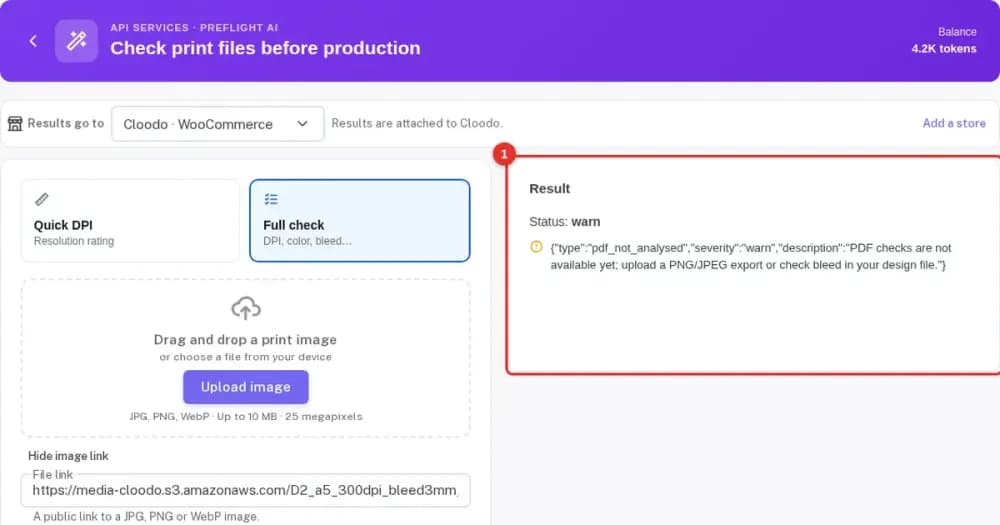
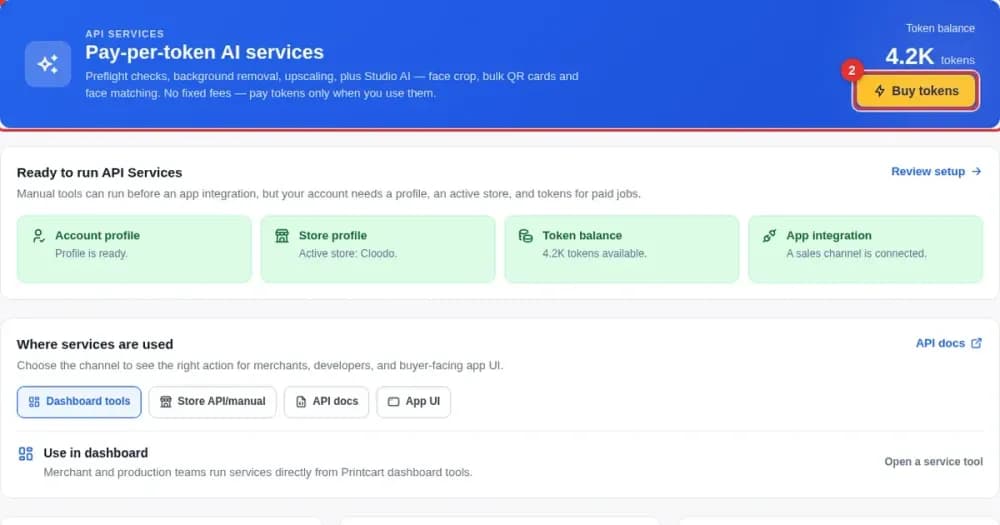
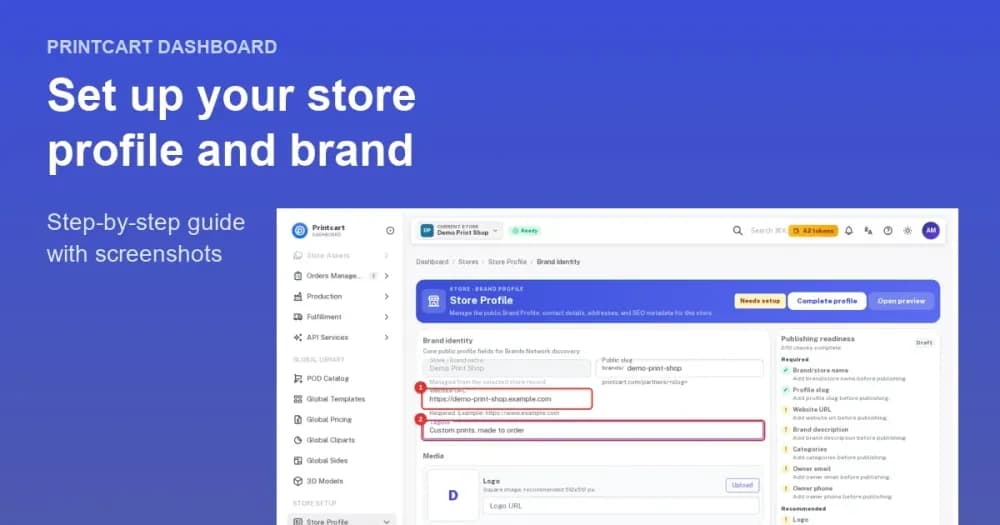
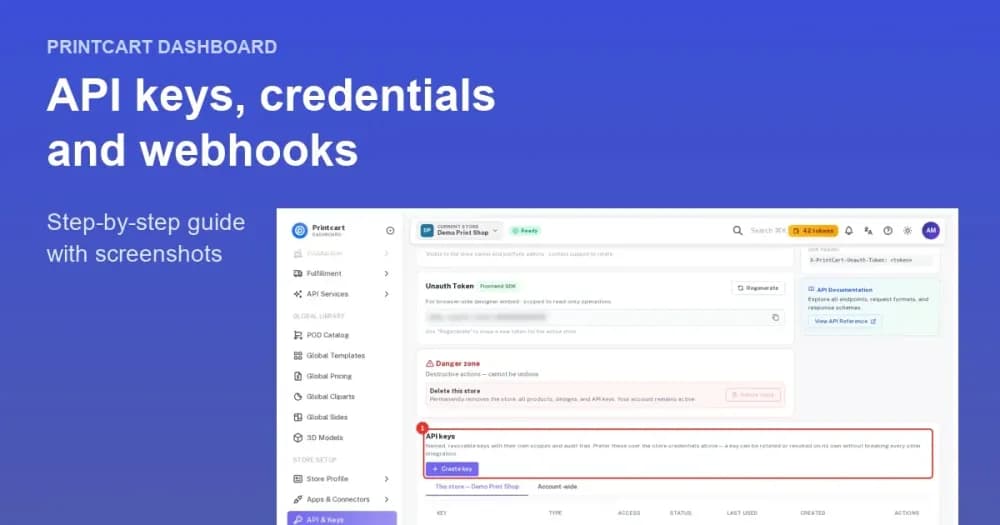
Manage it in the Printcart Dashboard


Store plans
One plan per store. See what each plan includes and pick the one that fits.
- Up to 100 products with the public designer
- Premium clipart library
- Premium design templates
- Advanced pricing options
- 500 order-upload file downloads per month
Frequently asked questions
What is W2P & POD Product Personalizer by Printcart?
A product personalization app for Wix Stores. Customers personalize your products with a live preview, and you receive print-ready files with every order, for in-house production (web-to-print) or print on demand.
Can I use my own products and product photos?
Yes. The app reads your existing Wix Stores products when you install it; you set the print or engraving area on each product photo at real size. You do not need to use a catalogue.
Can I upload my own fonts and designs?
Yes. Upload TTF, OTF or WOFF fonts and your own clipart or designs, and turn designs into templates where customers only change the name, date or message.
Will customers see a preview before they order?
Yes. The design is shown on your product photo, inside the print area you set, on desktop and mobile, before add to cart.
What files do I get for production?
Print-ready PDF, SVG and PNG (and JPG) per order, with CMYK export, so you can print, engrave, sublimate, embroider or pass files to a print partner.
Do I need print-on-demand fulfilment?
No. If you produce in-house you only use the personalization and files; print-on-demand products are optional.
Is there a free plan?
Yes. Free includes the designer on up to 10 products and 10 order file downloads. Premium is $49 a month or $300 a year, Advanced (B2B workspace, client approvals) $199 a month or $1,212 a year, Enterprise $499 a month or $3,048 a year, all billed through Wix.
Which products and industries does it support?
Apparel, mugs and drinkware, engraved gifts, business cards and stationery, signs and stickers, home decor and corporate gifts — any product you can photograph and define a print area on.
Does it work on mobile?
Yes, the personalizer works on any device and screen size.
Can you set up my products for me?
Yes. The Printcart team offers setup packages for your first products or your whole catalogue; contact support@printcart.com.
Can you work with a merchant in my country?
Printcart serves stores in over 80 countries; all billing is in USD through Wix.
Do you support my industry?
Printcart services are not tied to one industry. Full stores, custom development, integration and support are delivered remotely; tell us what you sell and we will say plainly whether Printcart fits.
How do I pay securely?
You sign the contract with and pay the company, Netbase JSC. App plans are billed through Shopify or Wix for stores on those platforms, and through PayPal for WooCommerce and direct stores. Full-store orders on solution.printcart.com check out through PayPal. Service work is quoted in writing in your Helpdesk ticket before any payment.
Who do I talk to?
Talk to our CEO, Huy Nguyen (David), on WhatsApp at https://wa.me/84937869689 or by email at support@printcart.com.
Support
Sell personalized products on your Wix store
Trusted by 2000+ stores. Install the free plugin and let buyers personalize or upload artwork on Wix.
Use more Printcart apps on your store
Works with the same Printcart account.

Working with Printcart
Printcart is a brand of Netbase JSC. Every Printcart service, from full web-to-print stores and custom development to integration and ongoing support, is delivered remotely, so a merchant in any country and any industry can work with us. Netbase has worked with clients in 80+ countries. Contracts and payments are made with the company, Netbase JSC. To discuss a project, contact our CEO, Huy Nguyen (David), on WhatsApp at https://wa.me/84937869689 or by email at support@printcart.com.